- Service Function
- |
- BMW Software
- |
- AutoHex Scanner
- |
- MicroTronik
BMW Service Function
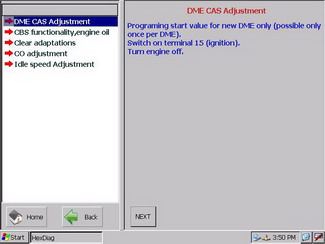
Instructions of a Service Function
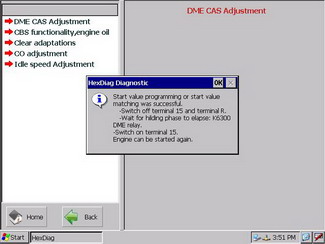
Steps For a Service Function
Service Functions
In AutoHex Auto scan tool (HexDiag) BMW software and by clicking (Service Function) item, you will be able to configure the Control Unit working conditions.On the right menu, you will see on the upper sub-menu, the conditions needed to carry out the function, and on the lower sub-menu the adjustment value which can be changed by clicking the buttons below
(-) and (+) and (SAVE) to save the new changes.
Samples of Service Functions in BMW
- Steering angle sensor Active steering
How to use autohex to adjust steering angle sensor for active steering
- DME CAS Adjustment
Demonstration of how to use AutoHex to adjust DME and CAS in BMW
- CBS Reset
CBS Reset in BMW (Engine oil, spark plugs ,front/rear brake,Brake fluid,Micro filter,..)
- EGS Reset Learn values
Autohex resets the learnt values in EGS, this page shows how easy the procedure is
- EGS Oil change
Some BMW Ecus for EGS require oil rest function, This service is avialbe in AutoHex BMW software
- Single axle Ride height adjustment
AutoHex demo explains how to adjust single axle Ride height adjustment in E60/E65/E70...
Autohex II Reviews

AutoHex Forum

Car Technical Information