Diagnostic Scanner
about products Support forum contact
Diagnostic Scanner
Diagnostic Scanner Diagnostic Scanner Diagnostic Scanner

Calibrating the Touch screen

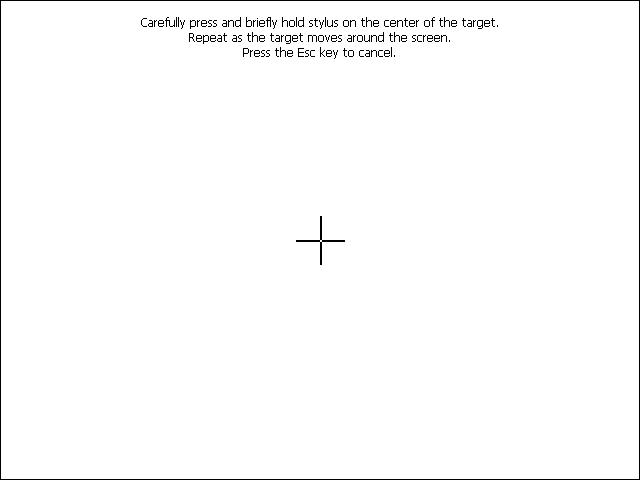
The Calibration Screen
The Calibration Screen .click for full size.
Calibrating the Touch screen:
  • Go to (Start) Menu.

  • Go to (Settings) menu.

  • Click (Control Panel) and it shows up on your screen.

  • Click (Stylus) and a pop up window will appear on the screen; you must choose (calibration Tab) and then click (Calibrate).
  • The whole screen will become white color with a black cross in the middle, just click the (Cross) accurately and the cross will move after that to the four corners of the screen and you must click accurately each time.
When calibration finishes, you can continue working on AutoHex Diagnostic scan tool , but it is recommended to restart the device after this operations.

Calibrating the Touch screen Keywords:

scan tool diagnostic scan tool touch screen

Chat With Us Now
Live Chat Microtronik
Please don't hesitate to chat with one of our sales or support team.
AutoHex Auto Scan Tool
Automotive Scan Tool
With AutoHex onboard diagnostic scan tool you can change the configurations of the car by the professional special functions in HexDiag software
Launch scanner swf file error: unable to launch script to run swf file,please enable scripts to launch scanner flash
Scan Tool Mercedes Benz onboard Diagnostic BMW Diagnostic onboard Scanner Toyota Diagnostic Scanner Fault Codes Finder
Mercedes Benz coding BMW coding Car Technical Info Car Electronics Car Sensors
Car Actuators Mercedes Benz onboard Systems Mercedes Technical Info