- Battery Control Unit
- |
- Benz special Systems
- |
- Mercedes Electronic
- |
- Technical Info
- |
- Car Tech Info
- |
- MicroTronik
Mercedes Benz 171 Battery Control Unit
main components
Battery
Charging
Jump start
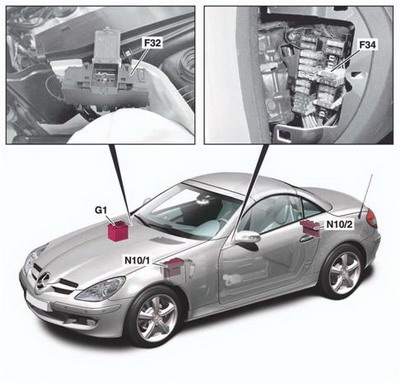
The main components
· F32 Front prefuse box· F34 Interior fuse box
· G1 Battery
· N10/1 Driver-side SAM control unit with fuse and relay module
· N10/2 Rear SAM control unit with fuse and relay Module
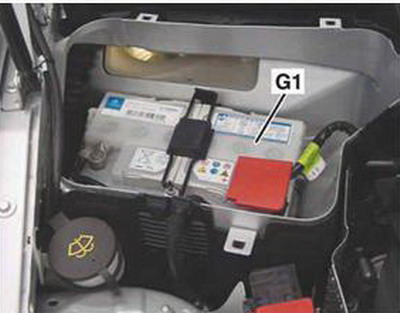
Battery
Overview· Location
The battery (G1) is located at the rear of the engine compartment on the right under the cover.
Notes
The battery cover must be removed without using tools.
Charging
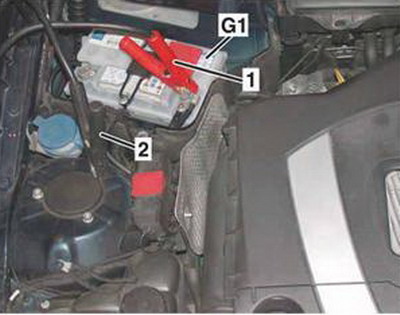
• Check condition of battery (G1).
• Connect positive clip (1) of charger to positive terminal of battery (G1).
• Connect negative clip (2) of charger to body ground point.
• Charge battery (G1).
· 1 Positive clip
· 2 Negative clip
· G1 Battery
Jump start
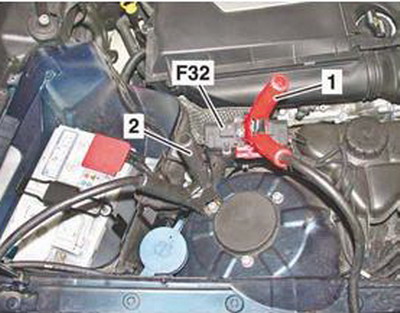
• Connect positive clip of jumper cable to positive terminal of jump-starting battery and positive clip (1) to positive terminal of front prefuse box (F32).
• Connect negative clip of jumper cable to negative terminal of jump-starting battery and negative clip (2) to ground terminal on righthand strut tower in engine compartment.
• Start engine.
· 1 Positive clip
· 2 Negative clip
· F32 Front prefuse box
Removal/installation
• Switch off ignition and switch off all electrical consumers.
• Remove transmitter key (A8/1) from EIS [EZS] control unit (N73).
• Disconnect ground line of battery (G1) and protect it against unintentional contact.
• Disconnect positive line of battery (G1).
• Remove battery (G1).
After the removal/installation of the battery (G1) basic programming (normalization) of the vehicle is required.
AutoHex (Auto Diagnostic scanner) is one of the best Professional scan tools to for Mercedes Benz; Autohex Scanner can test Mercedes Benz Systems effectively and easily, with many powerful features to help you in diagnosing and testing. For more information:
Mercedes Benz Scan Tool
BMW Key Programming
Description
In this section we have some useful information about some Mercedes Benz 171 battery control unit and it features.
Autohex II Reviews

AutoHex II
AutoHex Forum
Car Technical Information
Diagnosis and Coding