- HexDiag Software
- |
- AutoHex Scanner
- |
- MicroTronik
Running AutoHex HexDiag program
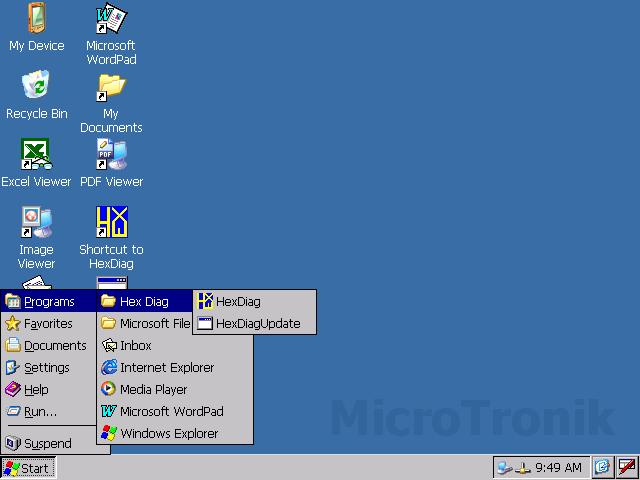
The Start Menu
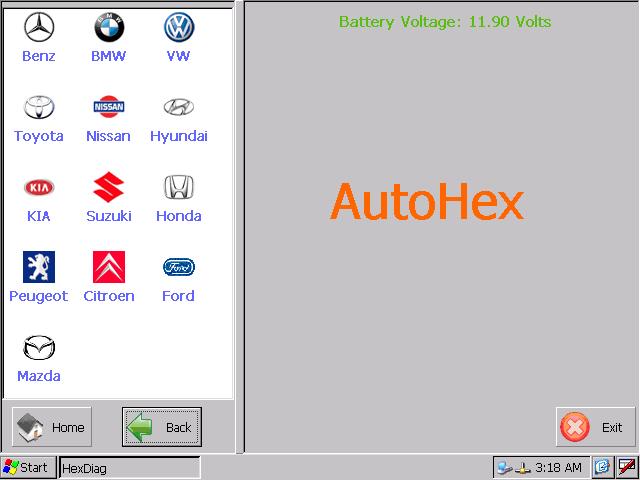
the Main Window
Running AutoHex (Hexdiag) program
Starting Autohex Diagnostic scan tool software (HexDiag), you can start the program from Start Menu, From Programs select HexDiag folder then choose (HexDiag).When the program runs, you will see the main screen.
HexDiag has a unique feature which will allow you to reduce your hits on the (Back) button. You will always see two lists at same time:
- Left list will have the functions you can select.
- Right list will show you the results of your selected function.
1. Home: used to get back to the main menu.
2. Back: used to return to the previous menu.
3. Exit: used to quit the HexDiag program.
Note: When the HexDiag, also a configuration tool program will start up automatically and it will be minimized, you can use it any time by clicking the icon in taskbar.
HexDiag starts automatically measuring the battery Voltage.
Important functions within the Configuration program:
By clicking the configuration tool, you will be able to change program configuration: 1. Changing measuring units: You can choose the suitable measuring system for his work. 2. Changing Brightness: You can adjust the brightness of the screen to suit his working conditions.
3. Changing program language: You can choose the suitable language to work with it.
Autohex II Reviews

AutoHex Forum